Enrolling as an xGov
An xGov is an Algorand address that has:
- Acquired voting power derived from consensus participation; and
- Enrolled as an xGov in this platform by paying the one-time enrollment fee.
Acquiring Voting Power
Voting power is calculated by looking at all blocks produced during an observation window of 3,000,000 blocks, always starting at the top of the millionth block. For example, the 3,000,000 blocks leading up to block 54,000,000.
Once you formally enroll and pay the account creation fee, the address will be included in the next cohort list. The cohort list is updated at every millionth block.
When the address enrolled is added the list, it will be added to the next voting committee. If the account joined, for example, after block 54,000,000 and before block 55,000,000, the address will only be added to the cohort list once the new version is available.
Every proposal gets assigned to the current cohort when it is submitted to vote.
The voting cohort is updated periodically (ie. monthly), which also means it can take a few days between paying to create your account and being able to vote on your first proposal.
Why is there a fee?
The voter account creation fee is a one-time, non-refundable fee that serves two purposes:
- Paying for the network and smart contract costs associated with the xGov profile; and
- Discouraging addresses that do not participate in consensus from creating accounts that cannot be used to vote.
How to Enroll
To enroll, click on the “Become an xGov” button at the bottom of the pop up window:

The sign-up window will be displayed (the amount in the example below is an example only):

Once you click on the “Submit” button, confirm the transaction with your wallet. The text at the bottom of the window will change to “Already an xGov.”

You can also check your status by visiting your profile page. Click on your wallet address button, and choose “Profile”. You will see the details of your address.

In your profile page, you’ll see your xGov status. The green tick above your voting address means the address is enrolled.

Once the voting committee has been updated, you will be able to vote on proposals. The voting committee is updated shortly after every millionth block, starting after block 54,000,000.
Your voting power will equal the number of blocks the account produced during the 3 million block window leading up to the millionth block, for example, between blocks 51,000,000 and 53,999,999.
You can participate in the proposal discussions on the Forum at any time.
Vote Delegation
You can assign a different voting address to delegate your votes to another wallet you control or someone else to vote on your behalf.
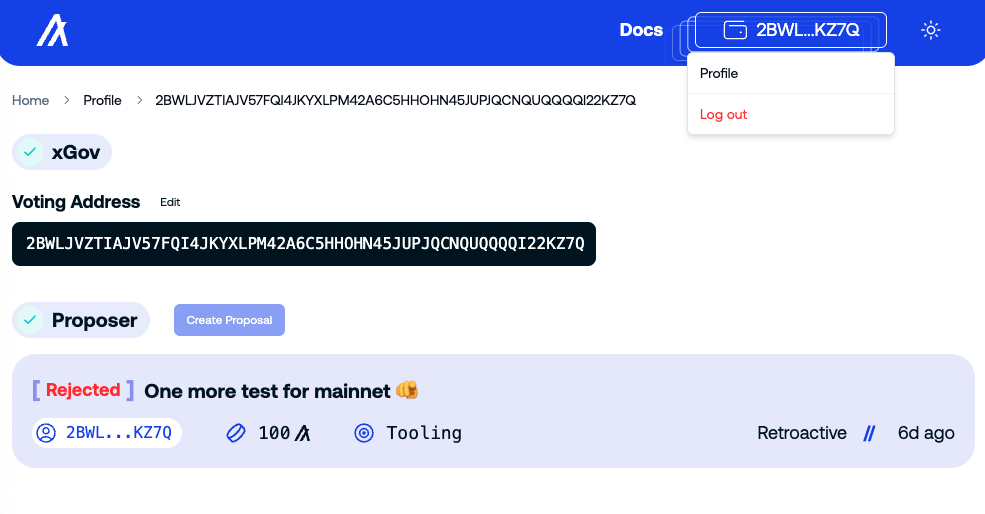
Click on the “Edit” link, paste the address you want to delegate to and click “Save”. Approve the transaction on your wallet. The voting address will be set to the new address.

Voting on Proposals
After discussing a proposal, the proposer may cancel it or initiate the voting session. When that happens, the proposal label will change from [Discussion] to [Voting].
The voting session for each proposal lasts two weeks.
If your address is in the voting cohort for the proposal, you will see the options to approve, boycott, abstain or reject the proposal.

If your address is not part of the proposal’s voting cohort, the message “You are not eligible to vote” will appear in the voting box, like below.

You can only vote once per proposal, and after you vote, the message “You voted!” will appear in the voting box.
Voting on behalf of others
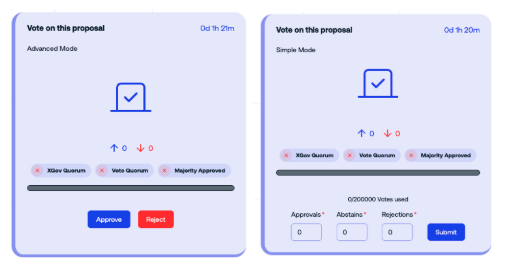
There is an advanced voting mode for governors who want to abstain or split their votes among different options: abstain, approve, and reject.
For example, Reti pooling managers voting on behalf of their pools shall use this option to relay their poolers’ preferences.
To access it, click “Advanced Mode” in the voting box to see all voting options.
Voting Quorums
A proposal is approved when it meets three voting requirements:
xGov Quorum
This is the democratic quorum, where one xGov = one Vote. It is the attention that a proposal needs to be valid. Yes, No and Abstain votes affects this quorum.
Approval thresholds
This quorum operates on a sliding scale, ranging from 40% to 70%, depending on the amount requested.
Vote Quorum
This is the weighted quorum of all the xGov Committee voting power. Yes, No, and Abstain affects this quorum.
This quorum operates on a sliding scale, ranging from 50% to 70%, depending on the amount requested.
Majority Approved
A proposal must receive at least 51% of the Yes votes to be approved. No and Abstain votes do not affect this quorum.
Boycott
The boycott vote is not counted in any quorums. It was created as part of the measures to mitigate voter absenteeism discussed with the xGov Council. The boycott vote signals that the xGov is present and attentive, but is not aligned with the proposal and does not want their vote to be counted in any quorums. Ultimately, this option makes the democratic quorum fail on purpose.
We like this quote from X that succinctly tackles the difference:
There are 2 fail conditions: democratic and weighted quorums. 1st is how many accounts show up, 2nd is how many voted for proposal. If you’re a whale and want to block a proposal, it’s better to vote no. If you’re small, it’s better to boycott. Uhudo, x.com
Absenteeism Mitigation Measures
Alongside the introduction of the Boycott vote, version 3.0.0 also introduced the removal from the registry of xGov accounts that never voted and a mechanism that observes whether a register account is participating in order to flag it for removal after it fails to cast any votes five times in a row.